Testing Zabbix Maps as Code — What the Blog Post Got Wrong
A few weeks ago I wrote Zabbix Maps as Code with Ansible, covering two approaches to managing Zabbix network maps through Ansible. The post was based on documentation, the Zabbix API reference, and experience with the community.zabbix collection. I did not run it against a live Zabbix 7.4 install before publishing, and the examples had five separate errors as a result — all fixed in the original post now. Building the test harness itself surfaced one more thing worth knowing, but it’s an environment gotcha rather than an error in the post’s examples (finding #2, below).
The test harness that found these issues lives in its own repo, zabbix-maps-as-code — clone it and run ./run.sh to reproduce the setup described below.
The test environment
Why Lima
Lima is a macOS VM manager built on Apple’s Virtualization Framework. You point it at an Ubuntu cloud image, it boots the VM, configures a shared network interface, and gives you SSH access using a key it manages in ~/.lima/_config/. No Docker Desktop subscription, no VirtualBox. For Ansible role testing on macOS, that combination is hard to beat.
The other reason is consistency. The ansible-zabbix role already uses Lima for its own integration tests — there are existing configs for zabbix-server, zabbix-agent, and zabbix-proxy in tests/lima/. The test setup here reuses those configs and runs the same role, so any provisioning bugs that surface belong to the role, not to the test harness.
The test uses one VM: Ubuntu 24.04 ARM64 with 4 GiB of RAM, running Zabbix 7.4 server and MySQL 8.0 on the same host.
What gets registered in Zabbix
The maps examples reference specific host names: db-zabbix-01, vip-lb-prod, zabbix-server-01, proxy01, proxy02, plus the Zabbix proxy groups host group. These need to exist as Zabbix host (or host group) objects before the map module runs. The module resolves host names to internal numeric IDs when building the API payload; if a name doesn’t resolve, it doesn’t drop anything — it warns (Hosts not found in Zabbix: [...]) and creates the element anyway, just with no host behind it. The map looks complete and that element silently never reflects real status. (A separate code path drops a link outright — but only when its from/to references a local element ID that doesn’t exist in the YAML, which is a typo in the link definition, not a missing Zabbix host.)
A setup_test_hosts.yml playbook creates these before each test run. The proxy01/proxy02 hosts have no monitoring interface — they’re dummy hosts monitored via a proxy group, exactly as described in the original post, and it’s their shared Zabbix proxy groups host group that the map’s Proxy Group element aggregates. The VIP hosts get ICMP interfaces at non-routable test IPs. They will always report as down, but the point is the objects exist so the map can reference them.
How run.sh works
The test runs through four phases:
1. Install deps     — ansible-core >= 2.16, community.zabbix collection,
                      pydotplus / webcolors / Pillow, graphviz
2. Provision        — start Lima VM, install Zabbix + MySQL via ansible-zabbix role
3. Register hosts   — create the Zabbix host objects the maps reference
4. Run maps         — execute create_zabbix_maps.yml against the live instance
./run.sh maps-only skips phases 1–3 and runs the maps playbook directly. Useful when the VM is already up and you are iterating on the topology data or the Jinja2 template.
Two inventory aliases, not one host in two groups
The inventory has a ZABBIX_API group for httpapi connections and a ZABBIX_SERVER group for SSH. Both point at the same IP, but through different host aliases:
[ZABBIX_API]
zabbix-maps-api ansible_host=192.168.105.X

[ZABBIX_SERVER]
zabbix-maps-ssh ansible_host=192.168.105.X
Putting the same hostname in both groups breaks things. Ansible merges group vars alphabetically by group name, so ZABBIX_SERVER wins over ZABBIX_API. ansible_connection=ssh from ZABBIX_SERVER:vars overwrites ansible_connection=httpapi from ZABBIX_API:vars for every play, including the ones that need httpapi. The maps playbook then tries to open an SSH connection with an API password it cannot use as a login credential. Separate aliases keep the var namespaces isolated.
The Zabbix repo workaround
The ansible-zabbix role sets up the Zabbix APT repository by fetching the directory listing from repo.zabbix.com and picking the last .deb with | tail -1. When the role was written, the latest entry in that listing was always built for the current Ubuntu LTS. Ubuntu 26.04 came out in April 2026, and Zabbix added ubuntu26.04 packages to the repo. Now tail -1 picks those instead.
On Ubuntu 24.04 the ubuntu26.04 packages fail to install: they require libc6 >= 2.43, libmysqlclient24 >= 8.4.2, and libxml2-16 >= 2.14.1, none of which ship in 24.04.
The fix in provision_zabbix.yml is a pre_tasks block that downloads the correct package by constructing the URL from ansible_distribution_version (which resolves to "24.04" on the Lima VM), then skips the role’s repo task with --skip-tags repo:
pre_tasks:
  - name: Remove any mismatched Zabbix release package
    ansible.builtin.apt:
      name: zabbix-release
      state: absent
    ignore_errors: true

  - name: Install Zabbix {{ zabbix_version }} repo for Ubuntu {{ ansible_distribution_version }}
    ansible.builtin.apt:
      deb: "https://repo.zabbix.com/zabbix/{{ zabbix_version }}/release/ubuntu/pool/main/z/zabbix-release/zabbix-release_{{ zabbix_version }}-1+ubuntu{{ ansible_distribution_version }}_all.deb"

  - name: Update apt cache
    ansible.builtin.apt:
      update_cache: true
The ignore_errors on the removal handles partial previous runs that already installed the wrong package.
What testing found
1. The entire auth pattern changed
The blog showed this playbook structure for Part 1:
- hosts: localhost
  connection: local
  module_defaults:
    community.zabbix.zabbix_map:
      server_url: "{{ zabbix_url }}"
      login_user: "{{ zabbix_user }}"
      login_password: "{{ zabbix_password }}"
community.zabbix 4.x removed server_url, login_user, and login_password. All modules now authenticate through Ansible’s httpapi connection plugin. Credentials belong in the inventory, not in module_defaults. The playbook runs against a ZABBIX_API group:
- hosts: ZABBIX_API
  gather_facts: false
With httpapi vars in the inventory (ansible_connection=httpapi, ansible_network_os=community.zabbix.zabbix, ansible_user=Admin, ansible_password=...), the module reads credentials from the connection. Nothing goes in the task. Every playbook example in Part 1 needed this change.
2. ansible-core 2.15 is too old
community.zabbix 4.x requires ansible-core >= 2.16. macOS ships Python 3.9, which cannot satisfy that version constraint (ansible-core >= 2.16 needs Python 3.10+). The test script locates the first available Python 3.10+ binary — Python 3.13 from Homebrew here — installs ansible-core with it, and prepends that Python’s user bin directory to $PATH before any Ansible command runs. The PATH update happens unconditionally so maps-only mode also picks up the right binary, not the system ansible.
3. zbx_map does nothing — the attribute is zbx_sysmap
Sub-map elements in DOT format use zbx_sysmap, not zbx_map:
"Datacenter" [zbx_sysmap="Datacenter"
               zbx_image_default="Server_(64)"
               zbx_image_problem="Server_(64)"]
The original post used zbx_map throughout. With the wrong attribute, the module creates a plain image element with no link to the referenced map — no drill-down navigation, no problem aggregation from child hosts. The module does not warn about unrecognised DOT attributes, so the map gets created cleanly and looks plausible; the elements just do not behave like sub-maps. Without a live test this one was invisible.
4. The icon set changed
The original post used Database_(64) for database hosts and Desktop_(48) for workstations. Neither exists in the Zabbix 7.4 default icon set. You can get the full list from the API:
curl -s -X POST http://ZABBIX_IP/zabbix/api_jsonrpc.php \
  -H "Content-Type: application/json" \
  -H "Authorization: Bearer TOKEN" \
  -d '{"jsonrpc":"2.0","method":"image.get","params":{"output":["name"],"sortfield":"name"},"id":1}' \
  | python3 -c "import sys,json; [print(i['name']) for i in json.load(sys.stdin)['result']]"
Zabbix 7.4 ships Server_(48), Router_(64), Switch_(48), Network_(48), Workstation_(48), Disk_array_3D_(64), and others. No Database_ or Desktop_ variants. The post now uses Disk_array_3D_(64) for database hosts and Workstation_(48) for workstations. Verify names against Administration → Images in your instance before using them — the set varies between versions.
5. zbx_url attributes cause map creation to fail
The DOT format section showed zbx_url_name and zbx_url as node attributes for adding click URLs. In Zabbix 7.4, including those attributes makes map creation fail with no clear error message pointing at the cause. They have been removed from all Part 1 examples. The Part 2 custom module uses a urls: YAML list handled through a different code path; that has not been tested yet.
6. DOT zbx_color is silently dropped — every link comes back the same color
The DOT format lets you set a per-link color through zbx_color:
"PostgreSQL" -- "Zabbix Server" [label="5432" zbx_draw_style=bold zbx_color="#0066CC"]
"Zabbix Server" -- "Proxy Group" [label="10051" zbx_color="#00AA00"]
The topology data behind it specifies two distinct hex colors — #0066CC for the database link, #00AA00 for the proxy links. Querying the live map afterwards through map.get shows every single link came back as #008000, a color that appears nowhere in the source data. community.zabbix.zabbix_map (or whatever DOT parsing sits underneath it) is silently discarding the requested hex and substituting a default — there’s no warning, and the map still gets created and looks plausible.
This isn’t a Zabbix API limitation: map.create/map.update happily store and return whatever hex you hand them. It’s specific to the DOT path. The Part 2 custom module sets color directly from plain YAML (color: "0066CC", no # prefix) and renders the exact requested hex with no surprises — confirmed side by side against the same topology on the same instance.
If link color is part of how you communicate topology — e.g. coding links by subnet or criticality — DOT-driven zbx_color cannot currently be relied on in 7.4. Either go through the custom module or expect to fix colors up after the fact via the API or the UI.
7. /var/lib/zabbix ownership breaks ICMP checks — silently
The VIP host examples in both parts monitor load-balancer/VRRP addresses with the built-in ICMP Ping template — you can’t install an agent on a virtual address, so ICMP is the only realistic option. ICMP checks run as the zabbix OS user, and if /var/lib/zabbix isn’t owned by that user, the check fails silently: no error in the frontend, no failed Ansible task, just a trigger that never fires and a map element that stays green regardless of whether the address actually responds.
ls -ld /var/lib/zabbix
chown zabbix:zabbix /var/lib/zabbix
What makes this worth calling out is that it has nothing to do with community.zabbix, the DOT format, or the custom module — it’s an OS-level prerequisite that sits underneath all of it. The map still creates fine and the element still appears; only watching whether it ever actually goes red reveals the gap. Both Part 1 and Part 2 now carry this permissions check (and an Ansible task to enforce it) ahead of the VIP/ICMP steps.
8. linktriggers arrays are flatly rejected by the 7.4 API
Both the DOT format and the custom module’s YAML expose trigger-based link styling — recolour a link when a specific trigger fires, so a map can show “this path is actually carrying the expected traffic” rather than a static topology diagram. It’s one of the more genuinely useful features on paper.
In Zabbix 7.4 it cannot be used at all. map.create and map.update reject any non-empty linktriggers array outright, with Invalid parameter: should be empty. The YAML schema and the custom module’s code both support the field — the rejection happens entirely on the API side, with no version flag or workaround. The post now carries a warning on this section in both parts and drops trigger-based styling from the feature comparison between the two approaches.
9. The DOT node’s quoted name is not its label, add zbx_label
Every Part 1 example writes nodes like this, and it’s natural to assume the quoted string becomes the on-map label — it’s the name you chose, and it’s what you reference when drawing links to and from the node:
"PostgreSQL" [zbx_host="db-zabbix-01"
              zbx_image_default="Disk_array_3D_(64)"
              zbx_image_problem="Disk_array_3D_(64)"]
It doesn’t. Rebuilding the infrastructure map around the corrected topology — db-zabbix-01 → vip-lb-prod → zabbix-server-01 → the Zabbix proxy groups host group → proxy01/proxy02 — and reading it back with map.get showed every element labelled with the referenced Zabbix object’s own name, not the friendly node identifier from the DOT source:
'label': 'db-zabbix-01'
'label': 'vip-lb-prod'
'label': 'zabbix-server-01'
'label': 'Zabbix proxy groups'
'label': 'proxy01'
'label': 'proxy02'
The quoted name ("PostgreSQL", "Database VIP", …) only ever serves as an identifier for wiring up links — it never reaches the stored label. The cause sits in community.zabbix.zabbix_map’s DOT-parsing code (_get_selements / _get_element_type / _get_label): the module first sets selement["label"] = remove_quotes(node), then immediately calls _get_element_type, which overwrites that with element_type.update({"label": element_name}) — element_name being whatever host.get / hostgroup.get / map.get returned for the object the node points at. The quoted identifier is discarded before the element is ever assembled.
The only way to get the label you actually want is to set it explicitly with the zbx_label attribute:
"Database VIP" [zbx_host="vip-lb-prod"
                zbx_label="Database VIP"
                zbx_image_default="Network_(48)"
                zbx_image_problem="Network_(48)"]
Re-running the same rebuild with zbx_label added to every node — and templates/map_dot.j2 updated to emit zbx_label="{{ node.name }}" for each one — produced exactly the labels the topology data specified:
'label': 'PostgreSQL'
'label': 'Database VIP'
'label': 'Zabbix Server'
'label': 'Proxy Group'
'label': 'Proxy 01'
'label': 'Proxy 02'
This one is easy to miss: the map still renders, positions and links all land where you put them, and a host’s technical name is plausible enough as map text that it doesn’t immediately read as wrong — it looks like a naming choice, not a missing attribute. The original post’s DOT examples have all been updated to include zbx_label; if you’re adapting them, don’t drop it.
10. Don’t set monitored_by: proxy_group on the proxy’s own Host object
The test harness registers proxy01 and proxy02 as real Zabbix Proxy daemon objects — connected, active, members of the zabbix-maps-test proxy group. It also registers same-named dummy Host objects (proxy01, proxy02) that the sysmap elements point at, since Zabbix maps can’t reference Proxy objects directly.
An earlier version of setup_test_hosts.yml set both dummy Host objects to monitored_by: proxy_group: zabbix-maps-test. Once the proxy group became real and populated, the reflex is to keep that configuration — after all, the proxies are now there. The problem is structural: having a proxy’s Host object monitored by the group its own daemon belongs to is circular.
If proxy01 (Host) is monitored_by: proxy_group: zabbix-maps-test, Zabbix server routes its checks through whichever group member is available — which could be the proxy01 daemon itself. Even if proxy02 picks it up instead, both daemons are in the same group: the moment the whole group goes offline — the exact event you most want to catch — both Host objects lose their monitoring path simultaneously, and you see nothing.
The standard practice is that proxy servers are monitored directly by the Zabbix server, not through any proxy. The server-direct path is the one that survives a proxy group failure.
monitored_by: proxy_group belongs on regular hosts whose checks should be relayed by a local HA proxy group — not on the proxies themselves. In the test harness that’s db-zabbix-01, which represents a database server that would naturally be monitored through the same local proxies as the rest of its site:
- name: Register db-zabbix-01 (simulated PostgreSQL host)
  community.zabbix.zabbix_host:
    host_name:    "db-zabbix-01"
    ...
    monitored_by: proxy_group
    proxy_group:  "zabbix-maps-test"
The proxy dummy hosts use monitored_by: zabbix_server. Both parameters get exercised; the proxy-group path runs on a host where it makes architectural sense. The original post’s examples use separate CPH/AAR groups rather than the same group the proxies are members of, so there’s no circularity there — but the principle holds: if your proxy Host objects and proxy daemon registrations share the same group, monitored_by: zabbix_server is the right choice for the Host objects.
Running the test
The test setup lives in its own repository, zabbix-maps-as-code, separate from the blog.
git clone https://github.com/Sifungurux/zabbix-maps-as-code.git
cd zabbix-maps-as-code
./run.sh            # full run: provision + register hosts + maps
./run.sh maps-only  # maps playbook only (VMs and Zabbix must already be up)
Requirements: limactl, ansible-playbook, brew, curl. The script installs ansible-core >= 2.16, the collection, and Python dependencies on first run. A cold run takes around fifteen to twenty minutes — it provisions three Lima VMs (Zabbix server plus two dedicated proxy VMs), most of the time waiting for package installs.
Verify the result at http://<VM_IP>/zabbix under Monitoring → Maps.
Part 2, tested — and what’s still open
An earlier draft of this post said Part 2 — the custom module — hadn’t run against a live instance yet. It has now, side by side with Part 1 against the same Zabbix 7.4.11 install, and a few things from that run are worth noting:
- The module’s connection parameters are
urlplus eithertokenorlogin_user/login_password— notserver_url/tokenas I’d guessed before testing it. It talks to the JSON-RPC endpoint directly through Ansible’s ownfetch_urlhelper (ansible.module_utils.urls) — no third-party HTTP library involved — so the httpapi changes from finding #1 don’t apply;group_vars/all/zabbix.yml(written byrun.sh) supplieszabbix_url/zabbix_user/zabbix_passwordand the playbook passes them straight through. - The icon names from finding #4 (
Disk_array_3D_(64),Server_(64),Server_(48)) work identically here — that’s an API-level constraint, not specific to either approach. - Finding #6 above came directly out of running this module against the same topology as Part 1: its plain-YAML
colorfield renders the exact requested hex, where the DOT path silently substitutes a default. If link color carries meaning in your topology, this is the approach that gets it right. - It behaves the way you’d want infrastructure-as-code to: re-running without
update=truereports the map already exists and changes nothing;-e update=trueoverwrites it cleanly and reports back thesysmapid.
Here’s the resulting map, rendered live by Zabbix 7.4 from maps_custom.yaml — colours match the requested hex exactly (finding #6), and every element resolves to a real host or host group with live problem status flowing through:
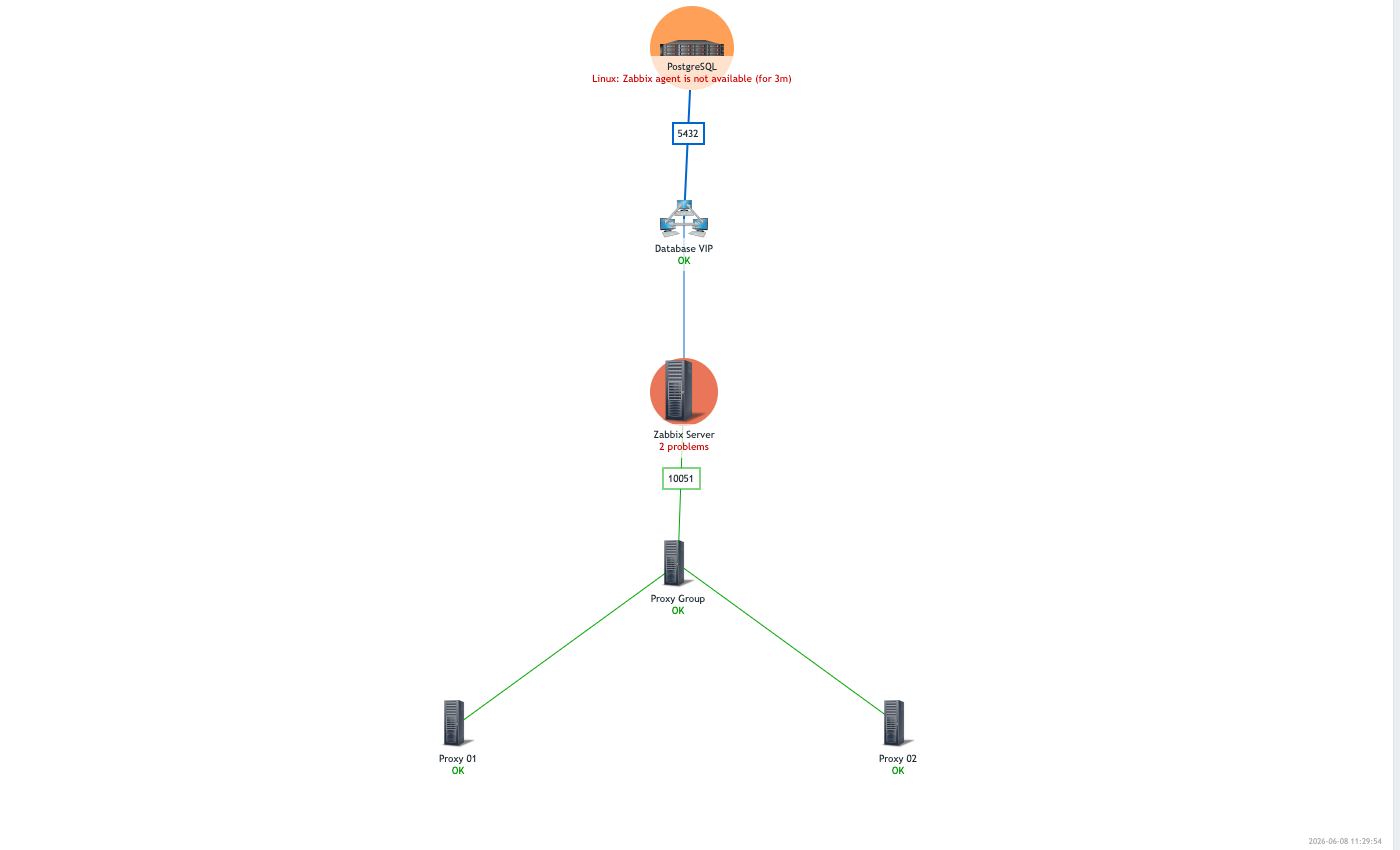
“Proxy Group” is a type: hostgroup element — a gap the module didn’t actually support when this series started (see the correction in the original post). It resolves group: "Zabbix proxy groups" to a groupid and shows the aggregate status of every host in that group, rather than reflecting any single host. Here both proxy01 and proxy02 are healthy, so the group element renders green and “OK” — directly underneath, but visually independent from, db-zabbix-01 and zabbix-server-01 reporting active problems further up the chain. That’s the element type doing exactly what it’s for: summarising “the whole proxy fleet” as one node instead of wiring up a link per proxy.
What’s still open: the test topology in maps_custom.yaml doesn’t define any urls: entries or link triggers:, so the module’s URL-handling and linktriggers code paths haven’t been exercised yet. Given that DOT’s zbx_url* attributes break map creation outright (finding #5) and the API flatly rejects non-empty linktriggers arrays regardless of which path builds the map (finding #8), both deserve a dedicated pass before you lean on them.