Making a apt-get proxy
updated 11 November 2015Running apt-get update && apt-get upgrade across ten servers burns time even on a fast connection. apt-cacher-ng solves this by caching downloaded packages on a local server so subsequent clients pull from the LAN instead of the internet.
Why a Proxy
Updating a handful of servers in a home lab can take three minutes each. At ten servers that adds up fast. Puppet could manage this through its manifests, but setting up a dedicated caching proxy is a useful exercise in its own right. apt-cacher-ng is the package of choice here.
Installation
Install the package on the caching server:
apt-get install apt-cacher-ngThe software needs minimal configuration after installation. The defaults cover most use cases.
Configuration of the server
Open the configuration file:
nano /etc/apt-cacher-ng/acng.confSet the cache directory (default, leave as-is):
CacheDir: /var/cache/apt-cacher-ngSet the log directory (default, leave as-is):
LogDir: /var/log/apt-cacher-ngBind to IPv4 only:
BindAddress: 0.0.0.0Repositories
This setup only uses Debian, so comment out all non-Debian repository mappings:
Remap-debrep: file:deb_mirror*.gz /debian ; file:backends_debian
Remap-uburep: file:ubuntu_mirrors /ubuntu ; file:backends_ubuntu
Remap-debvol: file:debvol_mirror*.gz /debian-volatile ; file:backends_debvol
#Remap-cygwin: file:cygwin_mirrors /cygwin
#Remap-sfnet: file:sfnet_mirrors # ; file:backends_sfnet
#Remap-alxrep: file:archlx_mirrors /archlinux # ; file:backend_archlx # Arch Linux
#Remap-fedora: file:fedora_mirrors # Fedora Linux
#Remap-epel: file:epel_mirrors # Fedora EPEL
#Remap-slrep: file:sl_mirrors # Scientific Linux
VerboseLog
Two logging levels are available:
0stores only type, time, and transfer sizes1also logs client IP and relative local path
VerboseLog: 1PidFile
Store the daemon process PID:
PidFile: /var/run/apt-cacher-ng/pidExTreshold
Days before considering an unreferenced file expired and eligible for deletion. Setting this too low risks deleting package files still needed when a mirror goes down. Four days is a reasonable value:
ExTreshold: 4Client Configurations
Two tests cover the proxy’s value:
- A fresh Debian 7.7 installation through the proxy to measure download speed
- A side-by-side upgrade comparison between two identical Debian VMs
New Installation with proxy
Start the installation normally, selecting language, keyboard, and partition settings. The net install image is 220 MB and requires internet access to download packages. The installation took roughly 10 minutes and 8-12 seconds to download 121 packages.
To use the proxy during installation, delete the pre-entered “mirror” hostname when prompted and replace it with the proxy server’s IP and port, for example 192.168.20.3:3142. When asked about an HTTP proxy, leave it blank and continue.
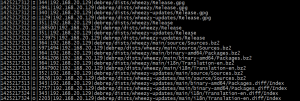
Proxy vs. none-proxy update
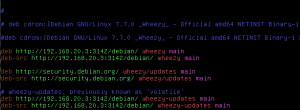
Configure the client to use the proxy by creating a new apt configuration file:
nano /etc/apt/apt.conf.d/02proxyAdd this line (no surrounding quotes):
Acquire::http { Proxy "http://192.168.20.3:3142"; };Alternatively, add the proxy address directly in /etc/apt/sources.list.
The upgrade test results:
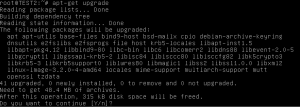
- TEST2 server: 48 MB in 2 seconds (with proxy, packages already cached)
- TEST3 server: 48 MB in 1 minute 47 seconds (without proxy)
The difference measured with a timer was 1 minute 51 seconds. apt-cacher-ng delivers a meaningful speedup for deployments and updates where multiple clients need the same packages.