SSH Key Authentication with LDAP
updated 06 July 2015Storing SSH public keys in LDAP lets clients authenticate without per-host authorized_keys files. This post covers adding the openssh-lpk schema, attaching a key to a user, and configuring the SSH daemon to query LDAP at login time.
Server Configuration
This setup uses GOsa as the web UI. Install the SSH plugin and schema, then restart Apache:
apt-get install gosa-plugin-ssh gosa-plugin-ssh-schema
service apache2 restart
If you are not using GOsa, create an LDIF file and add the content of openssh-lpk.ldif, omitting everything from entryUUID downward.
GOsa requires a specific public key format:
ssh-rsa <key> "comment" user@hostnameDo not use GOsa’s built-in “add key” function. It hashes the key in a way that is difficult to reverse.
First, verify the schema is present at /etc/ldap/slapd.d/cn=config/cn=schema/cn={0}openssh-lpk.ldif:
# AUTO-GENERATED FILE - DO NOT EDIT!! Use ldapmodify.
# CRC32 2619b35e
dn: cn=openssh-lpk
objectClass: olcSchemaConfig
cn: {0}openssh-lpk
olcAttributeTypes: ( 1.3.6.1.4.1.24552.500.1.1.1.13 NAME 'sshPublicKey'
  DESC 'MANDATORY: OpenSSH Public key'
  EQUALITY octetStringMatch
  SYNTAX 1.3.6.1.4.1.1466.115.121.1.40 )
olcObjectClasses: ( 1.3.6.1.4.1.24552.500.1.1.2.0 NAME 'ldapPublicKey'
  DESC 'MANDATORY: OpenSSH LPK objectclass'
  SUP top AUXILIARY
  MAY ( sshPublicKey $ uid ) )
structuralObjectClass: olcSchemaConfig
entryUUID: fef23996-8c64-1034-8985-2950d6358a31
creatorsName: cn=config
createTimestamp: 20150511200646Z
entryCSN: 20150511200646.585107Z#000000#000#000000
modifiersName: cn=config
modifyTimestamp: 20150511200646Z
Check whether the user already has a key attached:
ldapsearch -x '(&(objectClass=posixAccount)(uid=<Your user>))' sshPublickeyIf GOsa added the key, the output will show it base64-encoded:
sshPublicKey::c3NoLXJzYSBBQUFBQ....
To add a plain-text key, first delete the existing key from the GOsa web UI, confirm it is gone with ldapsearch, then create sshkey.ldif:
dn: cn=Jonas Pedersen,ou=people,dc=kirk,dc=local
changetype: modify
add: objectClass
objectClass: ldapPublicKey
-
add: sshPublicKey
sshPublicKey: ssh-rsa <your_key> "Comment" jkp@aptproxy
Apply the modification:
ldapmodify -x -D cn=admin,dc=kirk,dc=local -W -f sshkey.ldifVerify the key is now in plain public-key format:
ldapsearch -x '(&(objectClass=posixAccount)(uid=<Your user>))' sshPublickey
Client Configuration
OpenSSH Version
The AuthorizedKeysCommand directive requires OpenSSH 6.2 or later. To check:
ssh -VTo upgrade on Debian Wheezy, change the sources to Jessie:
deb http://apt-proxy:3142/debian/ jessie main
deb-src http://apt-proxy:3142/debian/ jessie main
Then upgrade:
apt-get update && apt-get dist-upgradeAlways test a dist-upgrade on a test server before applying it to production.
Alternatively, compile OpenSSH from source. Install the build dependency first:
apt-get install build-essentialThen build:
wget ftp://mirror.one.com/pub/OpenBSD/OpenSSH/portable/openssh-6.8p1.tar.gz
tar -zxvf openssh-*.tar.gz
cd openssh-6.8p1
./configure --with-md5-passwords --sbindir=/usr/sbin --with-pam
make
make install
sshd_config
nano /etc/ssh/sshd_configAdd the following lines beneath the AuthorizedKeysFile line:
AuthorizedKeysCommand /etc/ldap/sshLDAPkey.sh
AuthorizedKeysCommandUser sysk
AuthorizedKeysCommand specifies a program to look up the user’s public keys. The program must be owned by root and not writable by group or others. sshd invokes it with the authenticating username as the only argument; it prints zero or more authorized_keys-format lines to stdout. If the key from the command does not authenticate the user, sshd falls back to the normal AuthorizedKeysFile.
AuthorizedKeysCommandUser sets the user account under which the command runs. Use a dedicated account with no other role on the host.
Restart SSH:
/etc/init.d/ssh restartOn Debian Jessie with systemd, a restart can silently fail. Check the actual status:
/etc/init.d/ssh statusThe Lookup Script
Create the script:
nano /home/sysk/sshLDAPkey.shldapsearch -x '(&(objectClass=posixAccount)(uid='"$1"'))' 'sshPublicKey' | sed -n '/^ /{H;d};/sshPublicKey:/x;$g;s/\n *//g;s/sshPublicKey: //gpSet permissions:
chmod 755 /etc/ldap/sshLDAPkey.shThe man page requires the script to be owned by root and not writable by group or others.
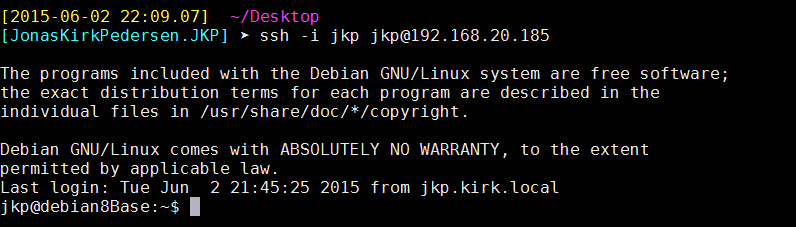
Test SSH key authentication: