Kippo project with kippo-graph
updated 11 November 2015Kippo is an SSH honeypot that presents attackers with a fake Debian filesystem and logs every command they run. This project deploys it on a Raspberry Pi with Kippo-Graph providing a web dashboard of attack statistics.
The project ran in Viseu, Portugal.
Introduction

The network diagram shows the school network (represented as a cloud) with the Raspberry Pi attached and receiving its IP from DHCP. The Pi has two interfaces:
- One facing attackers
- One for management
iptables redirects traffic from port 22 to Kippo’s management port. The management port number is intentionally omitted here.
Kippo provides:
- A fake filesystem resembling a Debian 5 installation with the ability to add and remove files
- Fake file contents so attackers can
catfiles like/etc/passwd - Session logs in UML-compatible format for replay with original timing
- Captured
wgetdownloads for later inspection - Trickery: SSH pretends to connect somewhere, and
exitdoes not terminate the session
Project concept diagram:

The concept diagram shows that once an attacker enters the honeypot they land on a closed network. Even closing the terminal window does not free them from the trap.
Replay a recorded attack session with:
~/kippo-read-only/utils/playlog.py <log file name>Log files live in /kippo-read-only/log/tty.
Install kippo
Hardware requirements:
- Raspberry Pi Model B rev.2
- SD card, 8 GB
- Physical network connection
- A router or firewall that supports port forwarding if the Pi is behind NAT
Install the dependencies:
sudo apt-get install subversion python-twisted python-mysqldb mysql-server apache2mysql-server stores Kippo’s session logs. apache2 hosts the Kippo-Graph dashboard.
Note: record the MySQL root password — you will need it in the next step.
Check out the Kippo source:
svn checkout http://kippo.googlecode.com/svn/trunk/ kippo-read-onlyThis downloads Kippo into /home/pi/kippo-read-only.
Set up the database:
mysql -h localhost -u root -pCREATE DATABASE kippo;
GRANT ALL ON kippo.* TO 'kippo'@'localhost' IDENTIFIED BY 'Kippo-DB-pass';
EXIT;Load the schema:
cd /kippo-read-only/doc/sql
mysql -u kippo -p
USE kippo;
SOURCE mysql.sql;
SHOW TABLES;
EXIT;SHOW TABLES should return a populated table list if the import succeeded.
Copy the default config and add the database credentials:
cp kippo.cfg.dist kippo.cfg
sudo nano kippo.cfg
Find the [database_mysql] section, uncomment all fields, and set:
[database_mysql]
host     = localhost
database = kippo
username = kippo
password = Kippo-DB-pass
Kippo listens on port 2222. If a router sits in front of the Pi, forward external port 22 to the Pi’s port 2222 in the router’s configuration.
If the Pi connects directly to the internet, redirect port 22 in iptables:
sudo apt-get install iptables
sudo iptables -t nat -A PREROUTING -p tcp --dport 22 -j REDIRECT --to-port 2222
sudo iptables-save > /etc/iptables.rules
Move the real SSH daemon to a high port so it stays reachable for management:
sudo sed -i 's:Port 22:Port 65534:g' /etc/ssh/sshd_config
sudo /etc/init.d/ssh restart
Reconnect using the new port: ssh user@ip -p 65534
Start Kippo:
cd /kippo-read-only
sudo ./start.sh
Verify it is listening:
sudo netstat -antp | grep 2222
The output should show port 2222 in LISTEN state with a Python process. The default root password for the honeypot is 123456. Change it by editing /kippo-read-only/data/userdb.txt and restarting Kippo.
Installing the kippo-graph
Install PHP and the required modules:
sudo apt-get install libapache2-mod-php5 php5-cli php5-common php5-cgi php5-mysql php5-gd
sudo /etc/init.d/apache2 restart
Download and extract Kippo-Graph:
cd /var/www
wget http://bruteforce.gr/wp-content/uploads/kippo-graph-0.9.tar
sudo tar xvf kippo-graph-0.9.tar --no-same-permissions
cd kippo-graph
sudo chmod 777 generated-graphs
Edit /var/www/kippo-graph/config.php and set the database connection details from the Kippo installation above.
Open the dashboard in a browser:
http://<raspberrypi_ipaddress>/kippo-graph/index.phpBoot up sequence
Kippo cannot run as root, but every script in the boot sequence runs as root by default. A bare entry in rc.local fails because it executes as root. The fix uses su to drop to the pi user before calling the Kippo startup script.
Add this line to /etc/rc.local:
su -c /home/pi/kippo.sh pi &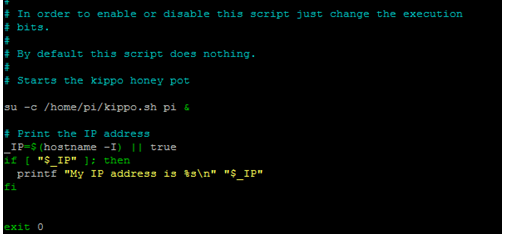
The kippo.sh script does three things:
- Installs the iptables rule that redirects port 22 to port 2222
- Changes directory to the Kippo folder
- Runs
start.shto launch Kippo in the background
To watch an attack in real time, run this from the kippo directory instead of start.sh:
twistd -y kippo.tac -n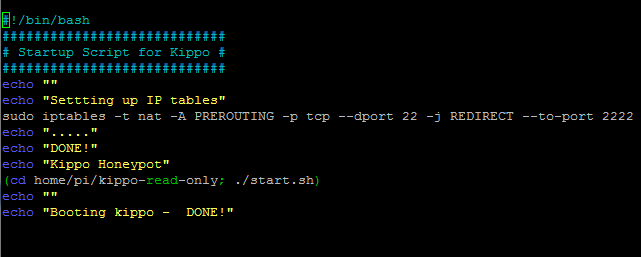
FS update
Kippo ships with a static fake filesystem. Updating it to mirror the actual Pi makes the honeypot more convincing.
Generate a fresh filesystem snapshot:
utils/createfs.py > fs.pickleAdd realistic content to environment files from a Gist (https://gist.github.com/zwned/5588521). This Python script populates uptime and top output with values from the real system.
Additional fake commands from the kippo-extra repository (https://github.com/basilfx/kippo-extra):
/usr/bin/env- current environment variables/usr/bin/gcc- fake compiler with file output/sbin/iptables- fake firewall management, supports flush and list for different tables and chains/bin/which- returns path of a binary
Copy live system data into the honeypot’s fake filesystem:
cat /proc/cpuinfo > /home/user/kippo/honeyfs/proc/cpuinfo
cat /etc/issue > kippo/honeyfs/etc/issue
cat /etc/passwd > kippo/honeyfs/etc/passwd
Update the text command outputs:
dmesg > kippo/txtcmds/bin/dmesg
mount > kippo/txtcmds/bin/mount