Locked disk after VM clone
updated 22 September 2016After cloning a VM in oVirt, the cloned disk can end up in a locked state that prevents the VM from booting. This post walks through the database fix to clear that lock.
Background
Early on, I built a Debian 8 server and turned it into a template for fast VM deployment. After a few months I discovered that VMs based on that template remained dependent on it. Cloning gave them their own UUID for both the VM and disk, which was the goal. But after cloning, attempting to boot produced a locked disk error.
Connect to the engine database
SSH into the oVirt engine host:
ssh ovirt-engineSwitch to the postgres user:
su - postgresEnter the PostgreSQL shell:
psqlList available databases:
\l
Connect to the engine database:
\c engineFind locked disks
Query for disks with imagestatus = 2 (locked):
SELECT image_guid FROM vm_images_view WHERE imagestatus = 2;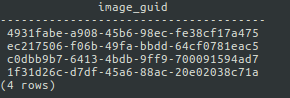
To see the VM names alongside the GUIDs, check the available columns first:
\d+ vm_images_view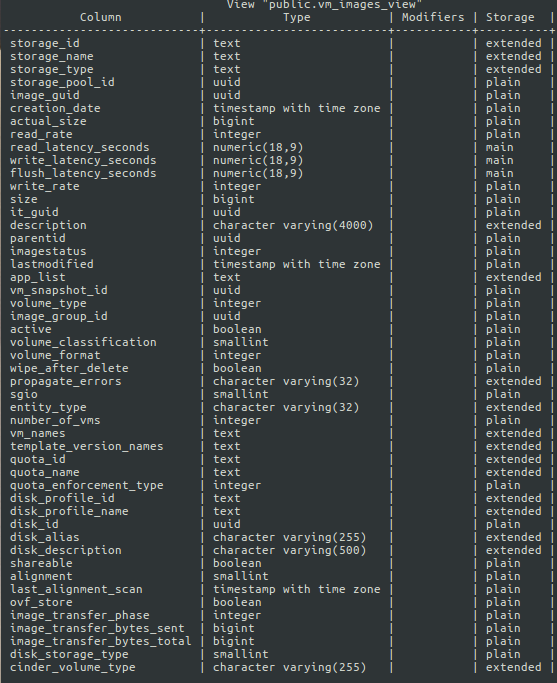
Then query both columns:
SELECT image_guid, vm_names FROM vm_images_view WHERE imagestatus = 2;
Four disks show as locked. Inspect one to confirm the row:
SELECT * FROM images WHERE image_guid = '4931fabe-a908-45b6-98ec-fe38cf17a475';
Unlock the disk
Set imagestatus back to 1 (OK):
UPDATE images SET imagestatus = 1 WHERE image_guid = '4931fabe-a908-45b6-98ec-fe38cf17a475';The response UPDATE 1 confirms the change. The disk lock is now cleared and the VM can be edited and booted normally.